Emboss turns your document’s history into a Writing Journey; a record of the sessions, pauses, edits, and revisions, that shaped your work over time.
As you write in Ellipsus, your documents and drafts are autosaved, which builds your version history. Emboss distills that history into a set of easy-to-read metrics—including active writing time, writing sessions, edits, thinking pauses, typing speed, and more.
Every Writing Journey can also have its own standalone URL, so you can share the process behind your work wherever you share the work itself.
Emboss is AI-free, and private by default. Your Writing Journey is visible only to you unless you choose to share it.
No AI is used to create or interpret any Emboss metrics. Emboss does not scan your writing for supposed “AI characteristics”, assign an “AI or human” probability, or judge / analyze the quality or content of your work. Instead, it shows information from your document or draft’s recorded creation history—e.g. proof-of-work.
The metrics are part of your document’s data, and are stored locally in your browser and encrypted at rest on Ellipsus’s servers.
The Writing Journey is free for all Ellipsus users. However, shareable public version history is only available via Ellipsus Plus.
Important to know
Because some Writing Journey metrics only started tallying when Emboss was released on June 10, 2026, older documents and imported work may not contain every metric or a complete record of their earlier writing process.
Writing Journey metrics currently describe your document or draft as a whole, and does not separate activity between individual collaborators or co-authors. As in the Reader, the document’s owner (username) will be listed as the work’s author.
Writing Journey metrics
Word count: Shows the full word count of a document or draft.
Active writing time: The amount of time spent actively typing (e.g. keystrokes) in a document or draft, excluding pauses. Active writing time is measured from the date this activity began being recorded (from June 10, 2026, the release of Emboss).
Sessions: The number of separate writing sessions (a new session begins after a gap of more than 30 minutes).
Average writing speed: Measures words written per active minute (excluding pasted text). This indicates that a person has typed this document, rather than a generative AI’s. instantaneous cadence.
Thinking pauses: Measures pauses longer than 5 seconds during active writing sessions.
Total edits: How many saved changes were recorded after the first version of a document or draft.
Word-to-edit ratio: The number of words divided by the number of edits in a document or draft (lower numbers mean more revisions).
How to access your Writing Journey
You can access your Writing Journey from three places in Ellipsus:
From your document/draft info
Click the three dots on a document or draft card, and select Information.
Select Writing Journey from the right side to view.
You can choose to download the Writing Journey as a JPG, PDF, or CSV.
This view remains private and is accessible only to document owners.
As a standalone URL
Open Share and export, then select Writing Journey.
Choose who can access the link:
Private: Document owners only
Partial: Owners and collaborators
Public: Anyone who views the Writing Journey link
You can also set your Writing Journey background to match your current theme.
On a Reader link
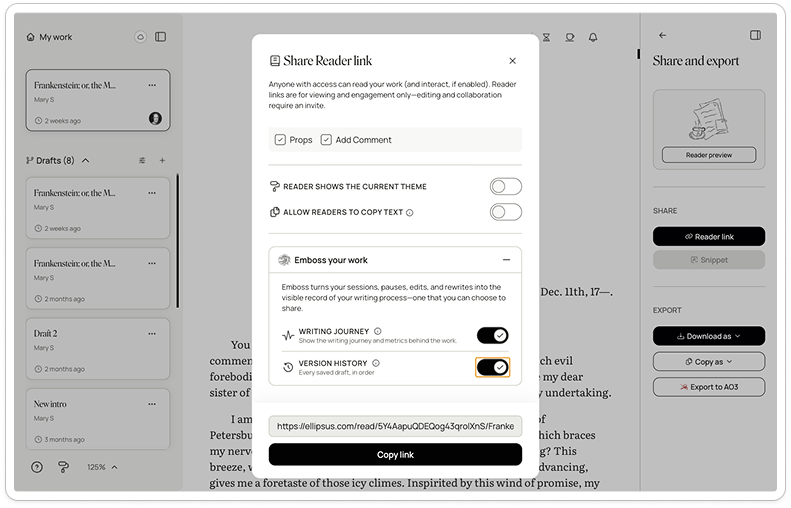
Open Share and export, then select Reader link.
Under Emboss your work, enable Writing Journey to include it in your Reader view.
Readers will see an Emboss badge at the top bar of the Reader beside your work’s title. Click on “Writing journey” to open the expandable metrics card.
Standalone links and the Writing Journey graph
Every Writing Journey now has a standalone URL option. You can share it wherever you share your work—on any platform, post, email, submission, etc.—to show the human labor behind it.
The URL contains the same metrics as in the editor and Reader view, along with a new words-written-over-time graph that visualizes your document’s progress from its creation to the present day.
The graph updates as your document changes, and reflects its latest history. Hover over any point on the graph to see your document’s word count at that point in time (grouped by day, week, or month).
The work’s title links back to a Reader view of your document. The Reader view remains private by default, and isn’t indexed or searchable. Sharing a Writing Journey URL does not otherwise make the document public. If you haven’t made the work public through Share and export, the Reader view is accessible only by direct link through the title on your Writing Journey URL.
Was this article helpful?
That’s Great!
Thank you for your feedback
Sorry! We couldn't be helpful
Thank you for your feedback
Feedback sent
We appreciate your effort and will try to fix the article