Emboss
Part of Ellipsus Plus
What is Emboss?
Emboss is an optional authorship tool that lets you share work history metrics showing the process behind a document or draft: number of sessions, revisions, typing speed, pauses, version history snapshots, and other metrics recorded as the document is written.
Emboss is not an AI detector—it does not scan finished writing and assume authorship. It does not produce a suspicion score, and it doesn’t evaluate writing quality. With Emboss, we want to move the conversation away from AI-suspicion—accusations and detectors—and toward process as a defense against these, letting the writer choose to share their work history to protect their work from accusations of this kind.
Emboss is fully opt-in, private by default, and controlled by the writer. Not every writer will use Emboss, and not every writer should have to use Emboss. A writer can choose not to share their process for reasons of privacy, access, or any other preference.
No AI is used in the compiling of these metrics.
Emboss is best explained as version history in bullet point form (this is generally how the Writing journey metrics were derived; see below).
Important to know
Imported work and older documents written/including writing from before Emboss debuted may not display every metric. Emboss draws on existing edit and version history, but several writing journey metrics only started recording when the feature was introduced (on June 10, 2026).
Writing journey metrics currently describe the draft as a whole rather than work split between collaborators.
Why Ellipsus made Emboss, and its use case
Emboss was shaped by 3,000+ survey responses (Ellipsus's paid plan survey, March 2026) and users requesting better ways to show the human process behind a piece of writing. (In our survey on potential Plus features, “AI-Safety: Proof that your writing was human-authored” was the third most-voted feature to include in a possible paid plan, after #1 “Supporting Ellipsus and helping keep it sustainable”, and #2 “Writing Insights”. #4 was Custom themes.)
For context—this is a growing issue: writers (especially within our own community) already face false accusations of AI use, institutional use of unreliable “AI detectors,” and broader issues of trust around human-made work.
A feature like Emboss has been one of our top goals for several years now, in response to recognizing the issues that AI generated content would pose to online spaces, the publishing industry, and education.
We feel that the rise of AI in creative spaces, and what that means for writers, is one of the biggest challenges facing writers today.
No platform can fully control how communities, readers, institutions, and creative spaces interpret the absence of a record of provenance (especially in the age of AI). But we can be very clear about our own stance: not using Emboss should never be treated as suspicious.
Where the Writing journey metrics come from
Emboss uses document activity information that already exists as part of how Ellipsus saves, syncs, records, and creates versions of your work. All metrics are derived from words typed over time.
For example, Active writing time is based on keystrokes. Words typed per minute is calculated from words added over active writing time. Thinking pauses (which are measured in seconds) are calculated from gaps between active writing periods. Total edits are based on document changes committed during the writing process.
Since these metrics are attached to your document or draft, they are stored locally on your browser, and encrypted-at-rest in our servers.
Emboss doesn’t “scan” your prose to decide whether it sounds human, or judge it on any metric not listed above. It does not determine whether your work is AI-generated or not. It displays process signals from the document’s creation history.
How to access Emboss
You can access your Writing journey in two places on the editor:
In the Document info card.
From the Share and export panel for public sharing via Reader links.
Viewing inside the editor
Click on the three dots on a document or draft card
Then click on Information.
Click on the left side of this panel to access your Writing journey.
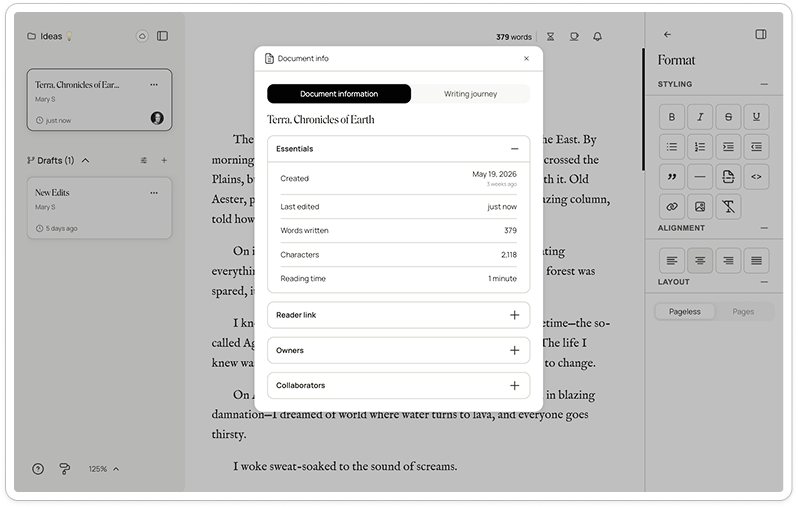
You can view this information at any time. It will update alongside your document or draft.
Public sharing
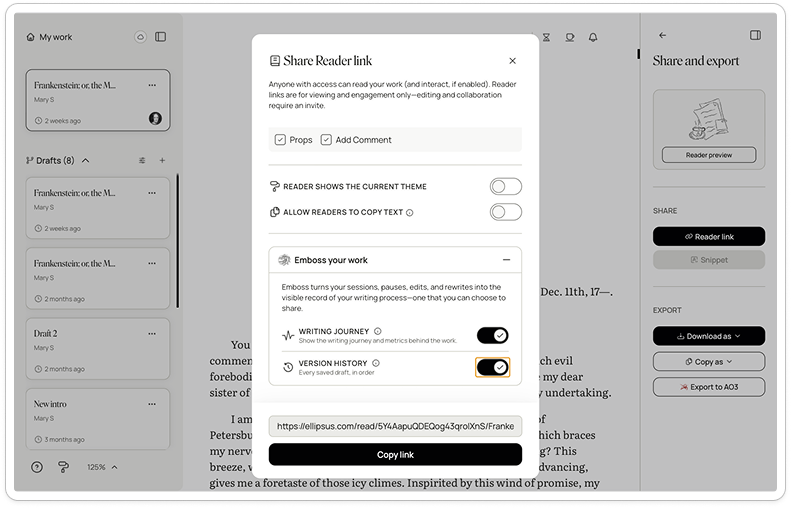
From the Share and export panel on the right sidebar, click on Reader link.
From there, open the Emboss your work section.
Toggle on writing journey to share it in your Reader link.
Readers will see an Emboss badge at the top bar of the Reader, and an expandable Writing journey metrics card beside your work’s title.
Clicking it opens a panel with your writing metrics.
Your Writing journey metrics
Your Writing journey draws on your document's edit and version history to show stats like:
Word count: The full word count of a document or draft.
Active writing time: The amount of time spent actively typing (e.g. keystrokes) in a document or draft, excluding pauses. Active writing time is measured from the date this activity began being recorded (on June 10, 2026; the launch of this feature).
Sessions: The number of separate writing sessions (a new session begins after a gap of more than 30 minutes).
Average writing speed: Measures words written per active minute (excluding pasted text).
Thinking pauses: Measures pauses longer than 5 seconds during active writing sessions.
Total edits: How many saved changes were recorded after the first version of a document or draft.
Words-to-edit ratio: The number of words divided by the number of edits in a document or draft (lower numbers mean more revisions).
Paste ratio: The percentage of all characters ever added to the document/draft that were inserted by pasting.
Public version history
For an added proof-of-work layer, you can also share selected version history snapshots alongside your work in the Reader, giving editors, teachers, publishers, or readers an in-depth record of the work’s development.
You can toggle on Version history from the Emboss section of the Reader link panel.
This will display snapshots of your document or draft’s version history in the right side of the Reader view.
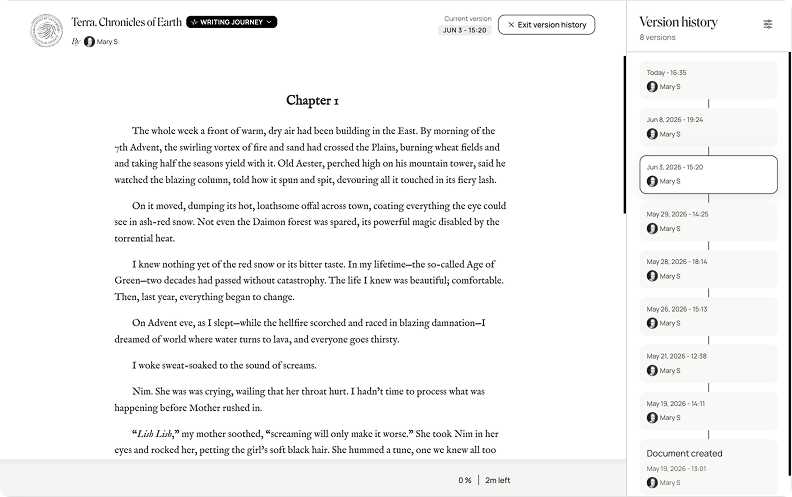
From there, you can choose to show versions from 30 minutes, hours, days, all the way up to months prior to publishing.
If you revert back to the free plan
Your Emboss badges and writing journey metrics will stay saved to your documents and account, but they won’t be visible or accessible while you’re on the free plan.
If you’ve Embossed work on Reader links, the Emboss badge and writing journey will no longer appear on those links until your Plus access is restored.
If you re-subscribe or upgrade to the one-time payment, your Emboss badges and writing journey will reappear on your documents and Reader links.
For more information, see Returning to the free plan