If you’re keeping an eye on your word choice or sentence structure as you go, or doing an editing pass before sharing your work, writing insights help you understand your writing patterns—sentence length, writing rhythm, density, passive voice, word frequency, vocab diversity—all without using AI.
Note: These insights do not represent a determination of the quality of your writing, nor are they meant to be a replacement for human feedback. They come from simple, programmed algorithms that run locally on your device.
TABLE OF CONTENTS
How to access your insights
Writing insights lives in the right sidebar in the editor. Open it to see your document’s analysis across nine different metrics.
The metrics update in real-time as you write, so it keeps up with you without interrupting your flow. On longer documents, you may briefly see an "Analyzing…" state while it finishes calculating.
The insights
Writing insights shows a set of metrics that you can use as guides—they're there to help you spot patterns and revise with confidence.
Writing insights primarily work with text written in English, although there is also more limited support for German, French, Spanish, and Portuguese.
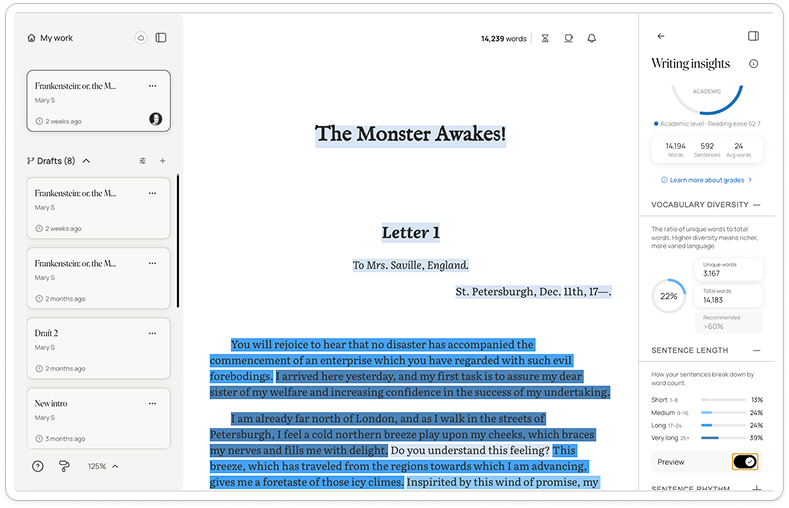
Text complexity
How complex your writing is overall, based on sentence length and word choice. This is sometimes referred to as readability or reading ease, and is a high-level metric utilized across areas of the publishing industry. This score is calculated using the Flesch-Kincaid readability tests, and can provide a general indication of the (US) grade or education level the work is accessible to.
A lower or higher number isn’t better; it just gives you a sense of how complex your text may feel to readers. Some writing is meant to be very clear and accessible, while other writing is intentionally dense and lyrical (or technical, or stylized, etc.).
Vocabulary diversity
The ratio of unique words to total words. Higher diversity means richer, more varied language.
Sentence length
How your sentences break down by word count (e.g. short, medium, long, and very long).
Sentence rhythm
Each bar of this metric is a sentence in your work: taller bars mean more words. You can hover over each bar to locate the sentence in your document.
Paragraph density
Each dot on this metric is a paragraph—the color shows how light or dense it reads (e.g. simple, moderate, complex, or dense).
Sentence opener
Shows what parts-of-speech start each sentence. (E.g. pronouns, articles, conjunctions, or others.)
Passive voice
Sentences where the subject receives the action instead of performing it.
Adverbs
Words that modify verbs, often ending in -ly.
Word frequency
Your most used content words, excluding common words like “the” and “and.” High counts may signal unintentional repetition.
Word echoes
Words repeated in nearby sentences, creating an unintentional “echo” effect.
Repeated phrases
A list of multi-word phrases that recur throughout your draft. You can see your top-ten most-used phrases (for all phrases containing up to six words).
Dialogue balance
The percentage of your document or draft that is dialogue vs. narration (dialogue highlighting can be toggled on or off).
Point of view
Which sentences are written from each perspective—e.g., first person, second person, or third person POVs.
Punctuation habits
Instances of expressive punctuation marks per 1,000 words.
What happens to writing insights if I cancel Plus?
If you revert to the free plan, you won’t be able to access writing insights. If you return to Ellipsus Plus, insights for your work will be available again.
Was this article helpful?
That’s Great!
Thank you for your feedback
Sorry! We couldn't be helpful
Thank you for your feedback
Feedback sent
We appreciate your effort and will try to fix the article